Let your agents loose. On a machine that isn’t yours.
Hangar gives Claude Code, Codex or any agent its own macOS, Linux or Windows VM, right on your Mac. It can install and run anything, and reach only the hosts you allow, with every connection watched from outside the guest. The same goes for CI runners, test machines and anything you’d rather not install on your Mac.
- Runs on your Mac
- macOS 27 or later
- Apple silicon
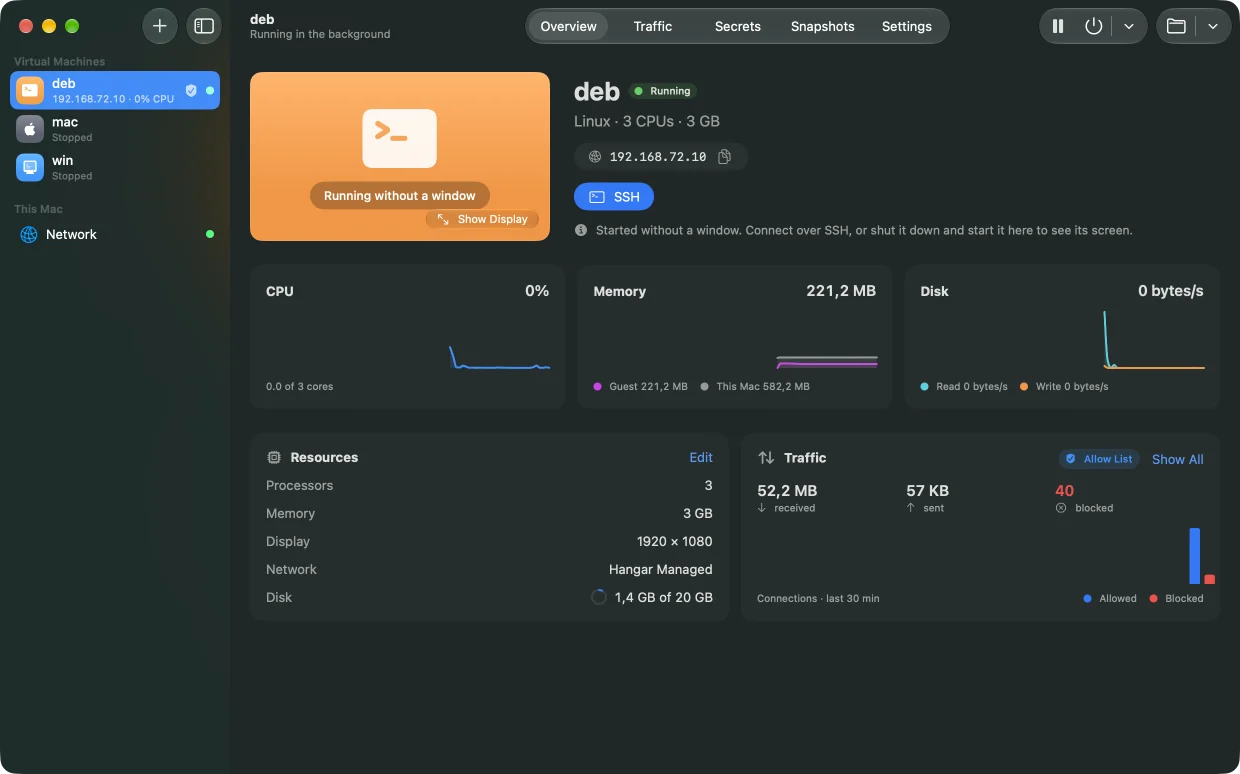
Every VM in one window, with what it uses and what it sends.
Made for everyday work
Different jobs.
The same sandbox.
AI agents
Give the agent a whole machine and only the hosts it needs. The worst it can break is a VM.
AI agentsClaude Code, Codex or your own, with approvals off.
AI agents
Give the agent a whole machine and only the hosts it needs. The worst it can break is a VM.
CI runnersA clean machine for every job.
CI runners
Every job starts from your team’s image, fenced off to the registries it pulls from.
TestingmacOS, Windows and Linux, fresh every run.
Testing
Install, test, restore. Every run starts from the same snapshot, on the systems your users have.
Software you don’t trustSee what it installs and who it calls.
Software you don’t trust
Run the installer in a VM and watch every connection it makes, from outside, where it can’t hide.
Team environmentsOne image, every Mac on the team.
Team environments
Push a VM to the registry you already use, and everyone creates the same machine from its tag.
Why a VM
Agents work best with full permissions.
Approving every command slows an agent to a crawl; skipping approvals on your own Mac is a bet with your files and keys. In a Hangar VM it works unattended, and you decide what it reaches.
Run your first agent in a VMNot a container: a VM with its own kernel, disk and network. Root, sudo, Homebrew and servers are all fine.
Create a VMIts model’s API, GitHub and npm, and nothing else. Start from a template for Claude Code or Codex.
Browse policiesEvery lookup and connection is seen from the Mac, where software in the VM can’t hide from it.
How traffic rules workShare one project folder, read-only if you like. The rest of your files stay out of the VM.
Shared foldersHangar. A sandbox you can see into
Every VM gets its own network, watched from the Mac, a way back to where it started, and a way to hand the same machine to your whole team.
Read the docsTraffic rules
Everything your agent talks to, in plain sight
Hangar watches from the Mac, so an agent can’t hide its traffic or switch the watching off: DNS lookups, host names from DNS, TLS and HTTP, bytes in and out, and what was blocked.
Build a policyRecord everything, block nothing. The default.
Block everything except the hosts you allow.
Allow everything except the hosts you block.
Cut the VM off at once. Only this Mac can still reach it.
Secrets
Tokens it can use. Never hold.
The value stays in your Mac’s Keychain. Inside the VM the variable holds a placeholder, and Hangar puts the real token in on its way to the hosts you allow, outside the guest.
How secrets workOnly these hosts are opened
HTTPS to a secret’s hosts goes through a proxy on your Mac, with a certificate authority of the VM’s own. Everything else passes as before.
The real server is checked first
Hangar checks the host’s certificate against your Mac’s trust before any request is sent. A host that doesn’t check out gets nothing.
A placeholder stays with its hosts
Sent to another of the secret’s opened hosts, it’s refused; anywhere else it stays a placeholder. The traffic log shows each secret put in, never the value.
Inside the VM
Reach inside. No SSH.
hangar exec runs a command in a running VM through Hangar’s agent, and hangar cp copies files and folders in and out, like docker cp. Neither needs a password, a shared folder or the network, so both work in an isolated VM too.
Running commandshangar exec
Output streams as it comes, and it exits with the command’s own exit code. -i sends your input, -t gives it a terminal.
hangar cp
What comes from the VM is checked before it’s written, and quarantined like a download, so macOS checks it before it first runs.
hangar logs
Read the log of a VM started in the background, or follow it as it’s written.
Snapshots
Let it try. Roll it back.
Take a snapshot before the agent starts; when it’s done, stop the VM and restore it. Snapshots are copy-on-write copies of the disk, so they’re instant and only take space as the disk changes.
Snapshots and imagesSnapshots
A snapshot keeps the disk, not the memory, so a restored VM starts up fresh. Taking one while the VM runs pauses it for a moment.
Clones
Start several agents from one clean snapshot. Each clone gets its own MAC address, IP address and machine identity, while the source keeps running.
Templates
A VM’s recipe. In one small file.
A .hangarvm file says how to make a VM: what it’s made from, its size and settings, its traffic rules, the secrets it expects and the commands that set it up. Keep one with a project; each VM made from it starts from a fresh image, not from a copy of yours.
How templates workNothing of your machine
No disk, MAC or IP address, passwords or secret values go in. Secrets are asked for when the VM is made.
Read before it runs
Before the VM is made, Hangar lists every shared folder, the traffic rules and every setup command. A folder shared read-write needs your say.
Setup commands
They run once, in order, once the VM has first started, with the VM’s secret variables. The first that fails stops the rest.
Images and registries
Share CI environments with your team. Privately.
Push a macOS, Linux or Windows VM, or one of its snapshots, to the container registry you already use. Hangar’s images are OCI images, so GitHub, GitLab, Docker Hub, Harbor or Quay take them as they are.
Share a VM through a registryPrivate
The image stays in your registry, behind your team’s sign-in. Hangar keeps the token in your Keychain.
Checked
Every part is checked against the image’s digest, and downloads carry on where they stopped.
No registry needed
Save a VM as a .tar file and pass that around instead.
MCP server
Let your agent drive Hangar. With your checks.
hangar mcp is an MCP server: Claude Code or Codex, running on your Mac, can create VMs, run commands and copy files in them, take snapshots and set their traffic rules. Its tools run the same hangar commands you would, with the same checks.
Connect your agentSome things stay with you
Secret values and passwords never pass through it, and it can’t delete VMs.
Commands with a limit
run_command runs through Hangar’s agent in the VM, and stops after 10 minutes unless the agent asks for longer.
Your rights, your approvals
It acts with your rights on this Mac: copy_files reads and writes your files, and traffic_policy can open a VM’s network. Keep your client’s tool approvals on for them if that matters to you.
One app, from the first boot to the last packet
Rules for the agents you run. Or your own.
All templates and the builderClaude Code
The API and sign-in, GitHub for plugins, npm for MCP servers. The optional Datadog telemetry hosts stay off.
Use thisCodex
OpenAI’s API and ChatGPT sign-in, with GitHub and npm to work with.
Use this+ 3 more
CI runner
Check out from GitHub, install from npm, PyPI, crates.io and Go, pull from Docker Hub.
Use thisThe license
Free for you. Fair for teams.
Hangar is free on any Mac used by one person. A company can also run it on shared machines and build servers with up to 100 CPU cores in total; more than that needs a separate license from Baseguard.